Alright, friends—gather ’round. If you’ve been hearing whispers about incredibly cheap products, mind-blowing deals, and a shopping app that seems to be taking over the world, you’re probably thinking of Pinduoduo.
You might know its younger sibling, Temu, which has exploded in the West. But let’s be real: Pinduoduo (or “PDD” as the cool kids call it) is the original beast. It’s where the real treasure hunt happens. We’re talking prices that make you question basic economics and a variety of goods that is simply overwhelming.
Sounds amazing, right? And it is—until you actually try to buy from Pinduoduo as an international buyer.
That’s because the app is entirely in Chinese. And if you’re living outside of China, figuring out how to get that cute sweater or high-tech gadget from a warehouse in Guangzhou to your doorstep in New York, London, or KL can feel like navigating a maze blindfolded.
Don’t panic! I’ve been down this rabbit hole, made the mistakes, and figured it out so you don’t have to. Whether you’re an international buyer in the US or Europe, or lucky enough to be in one of PDD’s “official” shipping zones like Singapore or South Korea, I’ve got you covered.
Grab a coffee (or a bubble tea), and let’s dive into how to hack Pinduoduo as a foreign beginner.
What You Need Before Buying on Pinduoduo
Pinduoduo is not Amazon. It has its own personality. Here are the weird things you need to know so you don’t feel stupid later.
1. The “No Shopping Cart” Phenomenon
Verified panic moment: “Where is the shopping cart button?!” It doesn’t exist.
Well, not in the traditional western sense. PDD wants you to buy now.
The Workaround: Use the “Favorites” (Collect) feature. When you see something you like, tap the little Heart Icon. This saves it to your “Goods Collection” in your profile. When you are ready to buy, go to your collection, select the items, and pay one by one.
2. The “Pin” (Team Buying) Concept
Pinduoduo literally translates to “Together More Savings.” The price you see is often a “Group Price.” Sometimes after you pay, you’ll see a status saying “Waiting for others to join”.
Did I buy it? Technically, no. Not yet.
Do I need to call a friend? No.
Usually, the app will automatically match you with some random stranger in China who also wants that pair of socks within a few hours. If nobody matches (which is rare), PDD refunds you.
Can Pinduoduo Ship Worldwide?
Yes, Pinduoduo does offer international shipping—but only to a few selected regions.
So before you click anything, there’s one thing we need to get clear first: your location matters.
Pinduoduo treats the world in two distinct categories:
- Official Shipping Regions: Places like Singapore, Thailand, South Korea, Japan, Hong Kong, Macau, and parts of Central and Western Asia. If you are here, congratulations! Your life is easy.
- The Rest of the World: The USA, UK, Europe, Canada, Australia, etc. If you are here, you need a middleman (a freight forwarder).
Let’s break it down by your location.
Step-by-Step: How to Buy From Pinduoduo
Scenario A: “I live in the US, UK, or Europe”
(The Non-Official Zone)
So, you’re in the West. Pinduoduo technically doesn’t ship directly to your house. If you try to put in a London address, the app will just look at you confused. But don’t worry, we have a workaround: Freight Forwarding (Transshipment).
Here is your step-by-step battle plan.
Step 1: Account Setup
First things first, get the app. Search for “Pinduoduo” on your App Store or Play Store. Download it. Register using your phone number or WeChat. It’s pretty standard stuff.
Step 2: Adding a Card
You can’t buy anything with good vibes. You need to pay.
- Go to the main profile tab (usually the bottom right icon that looks like a person).
- Look for “多多钱包” (Duoduo Wallet).
- Tap “银行卡” (Bank Cards).
- Hit “输入卡号添加” (Enter card number to add).
Pro Tip: You can use Visa or Mastercard! Pinduoduo has become much friendlier to foreign cards recently. However, keep in mind they might charge a transaction fee (usually around 3%), or your bank might hit you with a foreign transaction fee.
Step 3: Getting a Chinese Address
Since PDD won’t ship to New York, you need to send your stuff to a warehouse in China first. This is where a Freight Forwarder comes in. There are tons of companies out there (like Ezbuy, Superbuy, or private forwarding agents on WeChat). Sign up with one of them, and they will give you a specific warehouse address in China and a unique user ID to include.
- Go to “个人中心”(Your Profile).
- Tap “收货地址” (Shipping Address).
- Tap “添加收货地址” (Add New Address).
- Literally just copy-paste the Chinese address your forwarder gave you. Make sure you include your unique user ID so the warehouse knows it’s your package!
Step 4: Tracking Your Loot
Once you buy something, the seller ships it to that Chinese warehouse. You need to keep an eye on it.
- Go to “我的订单” (My Orders).
- Tap “查看物流” (View Logistics).
- You’ll see the tracking number. Copy this! You usually need to go to your Freight Forwarder’s website/app and “declare” the package by pasting this tracking number so they know it’s coming.
Once all your items arrive at the warehouse, you tell the forwarder to pack them all into one big box and ship it to your real house in the US/UK. Easy, right?
Scenario B: “I live in Singapore or Korea”
(The Official Shipping Zone)
You guys are the chosen ones. Pinduoduo has official logistics channels for you, meaning you don’t need a third-party agent. You can do it all inside the app.
Step 1: Adding Your Overseas Address
- Go to “收货地址” (Shipping Address).
- Select “添加海外收货地址” (Add Overseas Shipping Address).
- Fill in your real address in Singapore, South Korea, etc. (Just double-check that your specific area is covered, but major cities are almost always fine.)
Step 2: Choosing Your Logistics
When you checkout, PDD will offer you two main ways to get your stuff:
- 集运海运 (Consolidated Sea Freight): Cheaper, but slower. Great for heavy furniture or buying 50 pairs of socks.
- 集运空运 (Consolidated Air Freight): Faster, pricier. Good if you are impatient like me.
Step 3: The Consolidation Dance
“Consolidation” (集运 – Jí yùn) just means buying from 10 different shops, waiting for them to arrive at a central PDD warehouse, and then combining them into one box.
- Go to “个人中心” (Personal Center) → “跨境订单” (Cross-border Orders).
- Click “去集运” (Go to Consolidate).
- Select the items that have arrived at the warehouse.
- Pay the international shipping fee.
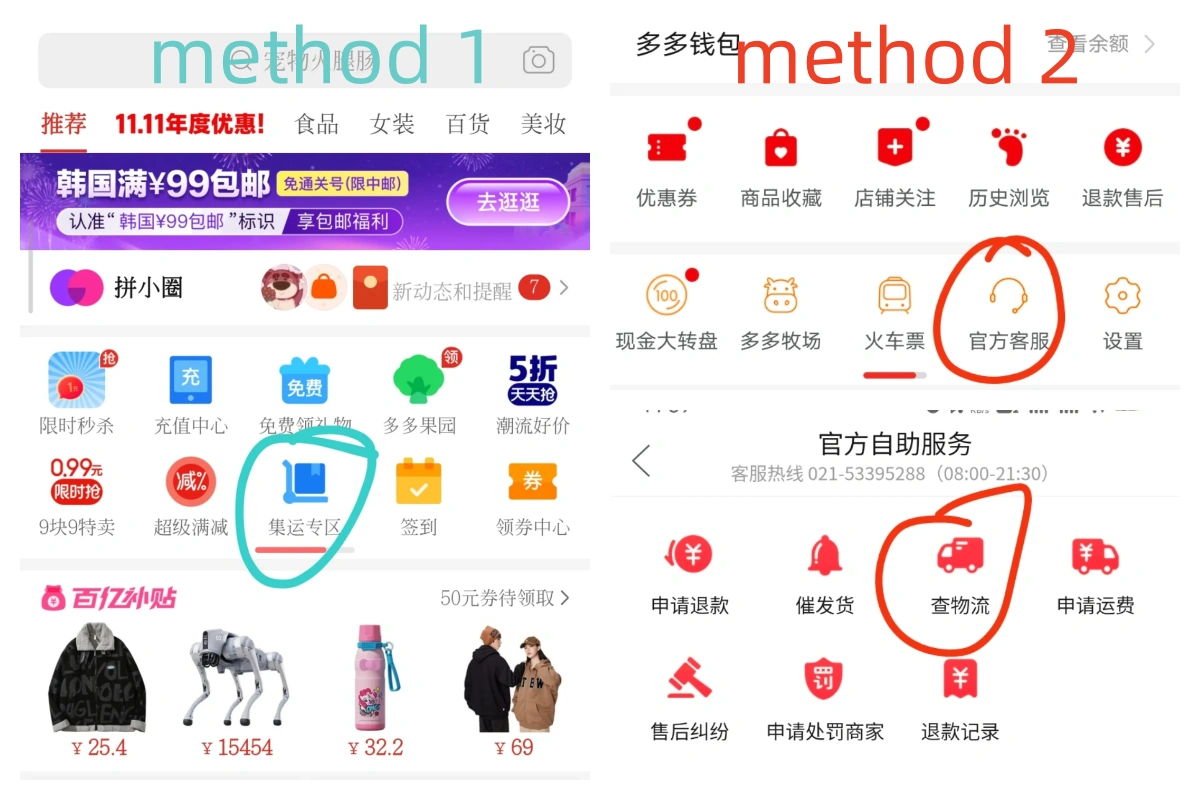
Step 4: Stalking Your Package
You want to know where your stuff is.
- Method 1: On the homepage, look for “集运专区” (Consolidation Zone).
- Method 2: Go to “个人中心” → 官方客服 (Official Service) → 查物流 (Check Logistics).
- Day 0: You scream “Shut up and take my money!” and pay.
- Day 1-3: Seller ships to the Chinese consolidation warehouse.
- Day 3-5: Warehouse receives it. (You trigger the international shipping now).
- Day 6: Warehouse packs it and sends it out.
- Day 8: It gets on a plane/boat.
- Day 18: It arrives in Singapore.
- Day 20: Customs clearance and local delivery.
- Total: Roughly 20 days. Patience is a virtue, my friend.
Frequently Asked Questions (FAQ)
Are there other safe ways to pay besides typing in my credit card directly?
What is the absolute cheapest way to pay?
If I use a foreign card, does the bill show up in USD or RMB?
Can Pinduoduo ship directly to countries like Australia or Germany?
Will I get a photo of my package when it arrives at the warehouse?
Can I buy frozen food? I really miss authentic dumplings/durian.
I paid, but it says “Pending Group” (拼单中). Did I waste my money?
Final Tips for First-Time Buyers
Buying from Pinduoduo is definitely an adventure. The app is loud, chaotic, and completely in Chinese. But once you get over that initial “culture shock” of the interface, the deals are unbeatable.
It’s addictive, so watch your wallet! Start with something small—maybe a phone case or a T-shirt—just to test the process for your specific location. Once you see that package arrive safely, you’ll be unstoppable.
Happy Shopping (or should I say, Happy Pin-ing)!
2026 Guide: Popular China Shopping Apps for International Buyers